In Pine Script, variables store a value per candle of the chart, they are in a way time series. A variable can be of type int (integer), float (decimal number), string (text), boolean (true or false) or color (color). It is declared as follows with the operator = :
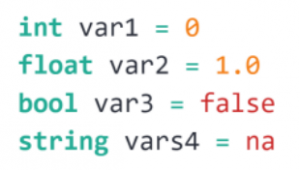
Here the variable is declared and initialized on each bar.
Note: it is not compulsory to indicate the type of the variable if the value is indicated; the compiler will assign the type based on the specified value. On the other hand, you must indicate the type if the value is na. na means « not available » and represents an undefined value; it is similar to None in Python.
To modify the value of a variable, we use the symbol := :
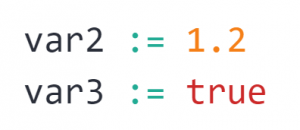
Note that you can modify the type of a variable. For example, using the following instruction, we convert a variable float to variable int (which in our case will take the integer value 1) :

It is possible to refer to past values of time series using the historical referencing operator []. Past values are the values that a variable had on the bars preceding the bar where the script is running – the current bar.
For example, close[0] is equivalent to close and provides the close price of the current candle; close[1] provides the price of the previous candle; close[2] provides price 2 candles away from current candle; …
To illustrate this, we will create a variable impulsion which returns True if one has a bullish impulse, i.e. if the variation between the low price of the candle considered and the high price of the penultimate candle is greater than 0.5%:

When the keyword var is used, the variable is only initialized once, on the first candle if the declaration. After that, it will retain its last value on successive candles, until it is reassigned a new value. This behavior is very useful in many cases where the value of a variable must persist across iterations of a script on successive bars. For example, to count the number of green bars on the chart:
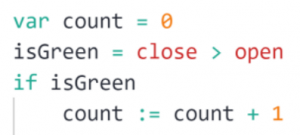
Without the keyword var, the value of the variable count would be reset to 0 (thus losing its value) every candle the script is executed.
Note: you can have a description of a keyword / function by hovering the cursor over this word. For example for the keyword var:
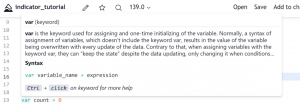
This makes it easy to know e.g. what are the parameters expected by a function.
Arithmetic operators in Pine Script are + (addition), - (substraction), * (multiplication), / (division), % (modulo); the comparison operators are < (inferior), > (inferior or equal), > (superior), >= (superior or equak), == (equal), != (different).
Finally, the module math of Pine Script allows to perform mathematical operations:
math.sqrt()–> square root;math.abs()–> absolute value;math.log()–> logarithm;math.round()–> rounding of a number;math.sum()–> sum of several numbers;math.min()/math.max()–> minimum / maximum among several numbers;math.random(a, b)–> generate random number between a and b.