Pine Script strategies simulate trade execution on historical data to facilitate backtesting. They include many of the same features as Pine Script indicators, while providing the ability to open, modify and cancel orders and analyze the results.
To create a new strategy, click on « Open » –> « New strategy ». Rename it. The following code is then displayed in the Pine editor:
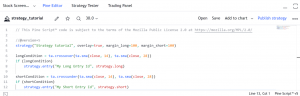
You see that a strategy is defined using the keyword strategy. We must assign a name to the strategy, it is here “Strategy tutorial”. Arguments margin_long and margin_short indicates the margin available for trades in long and short.
In this example, the function ta.crossover(serie1, serie2) returns true when the value of series 1 (here MA 10) passes above the value of series 2 (here MA 28), and false else.
If this condition is satisfied, we then open a long using the function strategy.entry with strategy.long as an argument. We must indicate a name/id for each open position: this name is here "My Long Entry Id".
On the contray, the function ta.crossunder(serie1, serie2) returns true when the value of series 1 (here MA 10) falls below the value of series 2 (here MA 28) and false else.
If this condition is satisfied, we then open a long using the function strategy.entry with strategy.short as an argument. The name of the trade is here "My Short Entry Id".
More generally, a Pine Script strategy uses all the notions of indicators that we have seen previously. We can of course plot these indicators on the graph using the function plot.
In addition to this, it includes the functionalities of a strategy (position opening/closing, balance, etc.).