In this part, we will see how to define functions, conditions if/else, loops for/while,… in Pine Script.
In Pine Script, a function is defined this way:
my_function(parameter1, parameter2) =>
...
The functions are easily identifiable thanks to the symbol =>.
We will create a function that takes as parameters the price source (open, high, low or close), the type of moving average (simple, exponential or volume), and the window/length for calculating the moving average:

We will add conditions in the body of this function conditions if/else, according to the value of MA_type indicated as parameter.
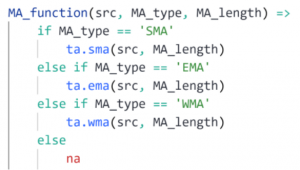
The time series sma, ema or wma will be returned according to the value of MA_type indicated. Otherwise, the function returns na.
In a statement if, we can combine several conditions using operators and, or.
Note that those statements if/else can be written more compactly with ? : ternary operator:

The function MA_function is then called as follows if we want to compute the EMA on close price, with window 20:

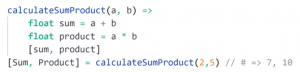
A function can also return several variables, which are enclosed in square brackets []. As in the following function which returns the sum and product of numbers a and b :
Variables declared outside the body of a function or other local blocks belong to global scope. Each function has its own local scope. All variables declared in the function, as well as the function arguments, are within the scope of that function, meaning they cannot be referenced from outside.
Note that the statements for and while can also be used for curls. For example, to count the number of green candles over the last 5 candles, we use the following for loop:
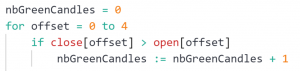
We can write these instructions more efficiently using the function math.sum() :
