À propos de la leçon
Variable values can be put as parameters of the indicator by using the function input :

input is followed by the type of variable to configure (source, int, string, bool, color,…). The 1st value in the parenthesis indicates the default value, while the text indicates the name of the parameter to modify. For a numerical value int or float, we can indicate the minimum value (minval), maximum (maxval) and the step (step).
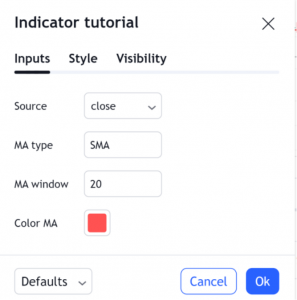
The commands are then displayed, and the user can change these parameters:
In our code, these parameters are then used in the MA_function and in its graphic layout:

And There you go ! You have developed your indicator 🙂 In the next chapter, we will see how to code a strategy in Pine Script.
Participer à la discussion